
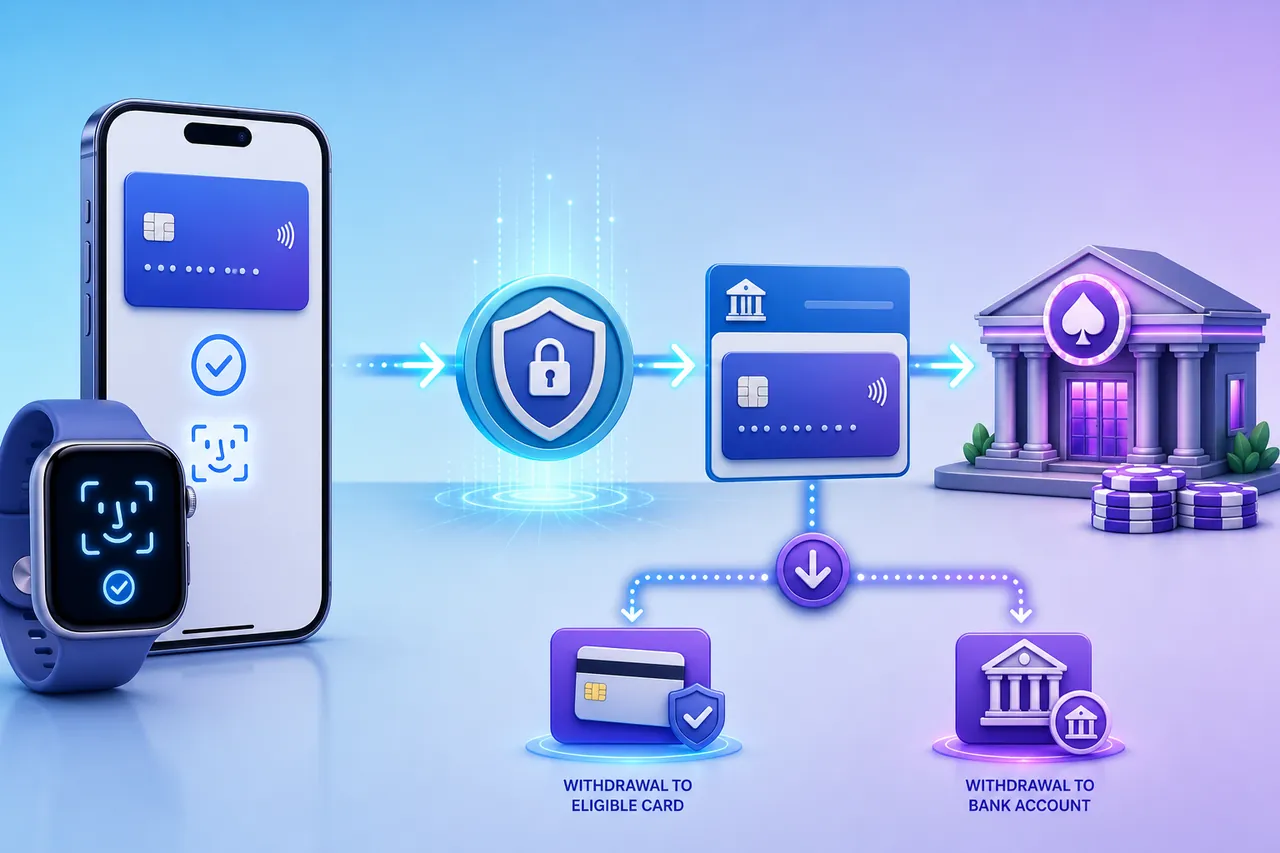
Apple Pay Casino Routes: Verify the Card, Then the Exit
Apple Pay removes card-entry friction, but the best casino route is the one that identifies both the eligible card behind the tap and the account that can receive the cash-out.
DraftKings Casino
- Documented route
- The operator guide documents Apple Pay deposits and an eligible withdrawal after a successful Apple Pay deposit.
- Market scope
- Eligible US jurisdictions, products, devices, browsers and linked cards only.
Decisive limitation: This example does not establish Apple Pay availability at another casino or for another card.
DraftKings Apple Pay guideMr Green Casino
- Documented route
- The reviewed operator deposit page names Apple Pay as a deposit option.
- Market scope
- Availability varies by country and account.
Decisive limitation: A deposit listing does not settle the withdrawal rail.
Mr Green deposit pageEditorially verified affiliate casino picks
The operator examples above document specific Apple Pay routes. The three affiliate cards below are separately approved by the editorial team and turn the live cashier, underlying card and receiving account into distinct checks.
 PayMethod Guide team-verified
Best for: Verifying the exact live deposit label
BitStarz Casino
- Check first
- Confirm the exact same-name card, device or browser handoff, currency and signed-in Apple Pay label before approving the deposit.
- Withdrawal gate
- Before funding this casino, resolve the payout question: Classify the live payout as Apple Pay-labelled return, underlying-card return or a named same-name bank or wallet fallback.
- Evidence to keep
- Keep the casino transaction ID, Wallet or issuer record, Apple Pay card-number suffix and written payout destination.
Decisive limitation: Editorial verification supports inclusion; reconfirm the current Apple Pay label before depositing because cashier menus can change.
 PayMethod Guide team-verified
Best for: Testing market and account scope
Mirax Casino
- Check first
- Casino product, jurisdiction, device or browser, issuer participation and account state are separate eligibility gates.
- Withdrawal gate
- Use the live market and account to test whether the receiving route changes: Classify the live payout as Apple Pay-labelled return, underlying-card return or a named same-name bank or wallet fallback.
- Evidence to keep
- Add the country, currency and exact cashier label to the evidence pack. Keep the casino transaction ID, Wallet or issuer record, Apple Pay card-number suffix and written payout destination.
Decisive limitation: The approved route is account- and market-scoped. Casino product, jurisdiction, device or browser, issuer participation and account state are separate eligibility gates.
 PayMethod Guide team-verified
Best for: Tracing the withdrawal destination
KatsuBet Casino
- Check first
- Classify the live payout as Apple Pay-labelled return, underlying-card return or a named same-name bank or wallet fallback.
- Withdrawal gate
- Map the final destination before the deposit handoff: Classify the live payout as Apple Pay-labelled return, underlying-card return or a named same-name bank or wallet fallback.
- Evidence to keep
- Preserve any written support answer alongside the transaction trail. Keep the casino transaction ID, Wallet or issuer record, Apple Pay card-number suffix and written payout destination.
Decisive limitation: Editorial verification supports the recommendation, but the current payout destination should still be checked before funding.
Editorial rule: Every casino card retains one team-approved affiliate CTA; public operator evidence and editorial CTA verification remain separate evidence layers. Evidence reviewed 12 August 2026.
Apple Pay authorizes the card; it does not hold the casino balance
Apple Pay makes authorization cleaner by presenting a device-specific payment credential instead of the physical card number in the usual form. The card issuer still approves or declines the charge, the casino still decides when to credit the account, and the withdrawal policy still decides where money can return.
| Layer | What it does | What it does not prove |
|---|---|---|
| Apple Wallet | Holds eligible cards and displays the card selected for payment | That every stored card can fund gambling |
| Apple Pay | Presents a tokenized credential after device authentication | That Apple Cash or Apple Card is accepted |
| Card issuer | Approves or declines the underlying card transaction | That the casino has posted the deposit |
| Casino cashier | Credits the gaming account and exposes eligible withdrawal routes | That the Apple Pay deposit label will also appear at cash-out |
Apple’s security overview explains the device-specific account number and transaction-specific security code. Apple Pay, Apple Wallet, Apple Cash and Apple Card are separate products; an Apple Pay logo proves none of the other three are accepted.
How to make an Apple Pay casino deposit without losing the payout route
- Open withdrawals first.
Find out whether the casino names Apple Pay, an eligible debit card, online banking or another verified destination.
- Use a payment card in your own name.
A device can hold family or business cards. Fast authorization is useless if ownership fails during withdrawal review.
- Check the exact card in the Apple Pay sheet.
Confirm the card, currency and amount. Do not assume the default Wallet card is the one you intended.
- Authenticate and wait for casino confirmation.
Device approval starts the handoff; confirm the casino balance and transaction history show a successful deposit.
- Keep both records.
Save the casino transaction ID and the Wallet or issuer record. The Apple Pay card-number suffix can connect tokenized and physical-card records.
Apple Pay casino withdrawals have three possible exits
“Apple Pay withdrawal” is not one universal rail. Open the signed-in withdrawal screen before depositing and classify the live route rather than relying on the deposit logo.
| Visible exit | What it means | Decision |
|---|---|---|
| Apple Pay-labelled return | The operator documents or displays an eligible return after a qualifying Apple Pay deposit | Confirm the exact account, card and market conditions |
| Underlying card return | The withdrawal screen identifies the eligible debit card rather than the Wallet button | Match the card suffix and ask what happens after card replacement |
| Named fallback | A same-name bank, ACH, online-banking or verified wallet route receives the cash-out | Verify it before the first deposit and price any extra conversion |
Current operator documentation proves that an Apple Pay-labelled return exists in some implementations; it does not establish support for every casino, market, account or card. A merchant refund is also different: Apple’s refund guidance explains how a purchase return can use the Apple Pay card number, but it does not prove that casino winnings use the same route.
Why Apple Pay is missing, declined or blocked at cash-out
| Symptom | Likely gate | Best next check |
|---|---|---|
| No Apple Pay button | Market, operator, product, device or browser | Sign in to the correct product on a supported Apple device and check local availability |
| Card cannot be selected | Card or issuer eligibility | Try another eligible same-name debit card or contact the issuer |
| Device approval but no casino credit | Processor or casino posting | Keep both records; do not repeat deposits until the first status is clear |
| Deposit works but withdrawal is absent | Payout policy or card return capability | Use the pre-verified fallback or ask support to name the receiving route |
| Casino questions the last four digits | Device-specific number differs from the physical card | Use Wallet card details to locate the Apple Pay card-number suffix, then provide only the redacted issuer evidence requested |
| Old card was replaced | Return-card continuity | Ask whether the issuer maps the replacement or another verified route is required |
Face ID, Touch ID or a passcode authorizes the device action; it does not replace casino checks for age, identity, location, payment ownership or source of funds. Keep the casino profile and payment account in the same legal name, and never send a full card number, password or unredacted statement through an insecure channel.
Fees and limits: follow the card and currency
Apple Pay appearing in the cashier does not establish a free deposit. The casino may show no fee while the issuer applies a card-account charge, cash-like treatment or foreign-exchange cost. The usable limit can be set by the casino, processor, jurisdiction, card or issuer.
- Check the casino fee and deposit limit.
- Confirm card type and issuer treatment.
- Compare casino balance currency with card currency.
- Record the withdrawal minimum and maximum.
- Price any extra transfer or conversion on the receiving route.
The cheapest-looking deposit can become expensive if it creates a second conversion or awkward payout fallback.
Apple Pay support in the US, UK and Sweden answers different questions
Apple lists all three countries among Apple Pay markets, but that is provider availability—not proof of casino acceptance or legality. The casino product, operator permission, processor, issuer and signed-in account remain separate gates.
| Market | Decision this page owns | Where to continue |
|---|---|---|
| United States | Use the global route model, then resolve state, operator and product scope | US Apple Pay casino guide |
| United Kingdom | Use an eligible non-credit funding route; the UK Gambling Commission says its credit-card ban also covers credit cards used through digital wallets such as Apple Pay | UK Gambling Commission wallet guidance |
| Sweden | Expect payment ownership to matter; Swedish technical rules require the licensee to be able to ensure that the declared payment-service holder is the player | Swedish Gambling Authority SIFS 2022:3 |
Search demand does not prove that a named casino is available in any of these markets. Check local rules and the live account before funding.
Apple Pay versus direct debit card versus bank transfer
| Route | Strongest advantage | Decisive limitation | Best fit |
|---|---|---|---|
| Apple Pay | Clean device authorization without manual card entry | Button and payout depend on device, browser and tokenized card | Apple user with a verified payout route |
| Direct debit card | Visible relationship between card and account | Issuer restrictions still apply | Card supports deposit and return credit |
| Bank transfer / ACH | Clear same-name ownership and stronger two-way structure | More bank steps and possible posting delay | Withdrawal continuity over one-tap funding |
| PayPal / e-wallet | Recognizable separate receiving account | Wallet KYC and cash-out fees add a layer | Verified two-way wallet users |
Compare bank transfer casinos and the payment-method mismatch guide before using a deposit-only route.
When Apple Pay is the right casino method
Choose Apple Pay when the card is yours, the casino is appropriate for your location, the option appears in the signed-in cashier and the withdrawal route is already visible. It is especially strong when you want quick device authorization without typing card details into the cashier.
Choose direct bank or wallet funding when Apple Pay is deposit-only for the account, the underlying card is unreliable for gambling transactions or you need a clearer two-way route across devices.
Trace the card behind the tap and the account that receives the payout.
Primary sources checked
- Apple Pay security and privacy overview
- Apple Pay merchant refunds
- Apple Pay countries and regions
- Apple Pay card-decline guidance
- UK Gambling Commission digital-wallet guidance
- Swedish Gambling Authority payment-ownership rules
Apple, UK and Swedish primary sources and public operator payment policies were checked on August 12, 2026. Provider coverage does not prove casino acceptance; operator documentation establishes published policy, not universal account-level availability or a completed PayMethod Guide transaction.
Complete the deposit-to-withdrawal decision
A payment logo only answers how the route starts. Check the receiving method, total cost, verification gate and failure path before funding an account.
Apple Pay casino FAQs
Do online casinos accept Apple Pay?
Some do. Availability depends on the casino, country or state, product, account, device or browser, processor and underlying card. The signed-in cashier is the final check.
Can I withdraw casino winnings to Apple Pay?
Some operators document an Apple Pay withdrawal route after an eligible deposit. Others return funds to the underlying card or require a bank or wallet fallback. Confirm the withdrawal page before depositing.
Is Apple Pay the same as Apple Cash?
No. Apple Pay presents eligible cards for payment; Apple Cash is a separate US stored-value product. An Apple Pay logo does not prove Apple Cash acceptance.
Why do the Apple Pay card digits differ from my physical card?
Apple Pay can use a device-specific account number. Keep the Wallet card-number suffix and issuer record so the casino can connect the tokenized payment to the same-name account if needed.
Does Apple Pay remove casino KYC?
No. Device authentication does not replace the casino’s age, identity, location, payment-ownership or source-of-funds checks.
Does Apple Pay charge casino fees?
The full cost depends on the casino, underlying card, issuer and currency path. Check the cashier and issuer terms rather than treating the Apple Pay button as proof of a fee-free route.